Simplifying Contact Search on iOS with Filters
A User-Centered Approach to Simplify Contact Search with Smart Filters
Product Design
UX

Project Overview
Contacts are a fundamental feature of every smartphone. Despite iOS offering an elegant user experience in many areas, its contact search functionality remains limited. The current system lacks advanced filtering options, leaving users to scroll endlessly or type exact names when trying to locate a contact. This case study explores the design of a feature that introduces easy-to-use filters, such as “Recently Added,” “Favourites,” and “Emergency Contacts,” to enhance the contact search experience on iOS.
Identifying the Problem
While using iOS to find contacts, I noticed how cumbersome it could be to locate specific groups of people. For example:
Finding a recently added contact required me to recall their name.
Locating emergency contacts amidst hundreds of entries was not straightforward.
Favorites were accessible, but only through a separate “Phone” app tab, not directly in the “Contacts” section.
These observations were backed by informal feedback from peers who faced similar frustrations. The absence of filtering options added unnecessary friction to a basic task, inspiring me to rethink the contact search process.
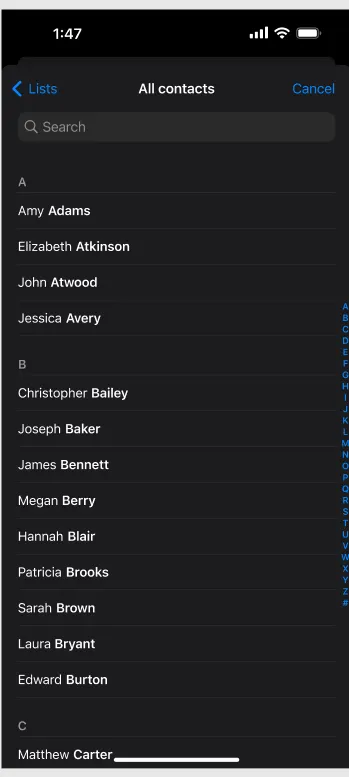
Existing iOS Contact Screen
Proposed Solution:
This solution introduces a filtering system to the iOS “Contacts” app, allowing users to:
Filter by Recently Added — Quickly access contacts added in the last week, month, or custom timeframe.
Filter by Favorites — Directly view contacts marked as favorites.
Filter by Emergency Contacts — Highlight contacts marked as emergency numbers, especially useful in crises.
These filters appear as a horizontal scrollable menu above the contact list, ensuring they are accessible but unobtrusive.
Impact
This feature simplifies the process of finding contacts, saving time and reducing frustration. It is also particularly valuable in emergencies, offering swift access to critical contacts.